
VineScribe: Digitizing Handwritten Wine Tasting Notes with AI
It works! But there are a few things I'd change.

VineScribe

TL;DR
VineScribe is a quick fun tool I made to:
Digitize my wife’s and my growing handwritten wine tasting notes
Match wine labels to those in the database
Share our tasting notes back with us
It uses an email inbox to queue, allowing a Raspberry Pi to read and write data without requiring a full web server. A cron job periodically checks for new emails, so it’s not instant but keeps things lightweight.
Features:
📸 Capture Notes:
Email photos of handwritten wine tasting notes
OCR with Gemini for text extraction
🍷 Recommendations and Comparisons
Send wine label photos for comparisons
Reviews your tasting notes and returns those or similar based on your taste profile
Email-based interaction for easy access
Tech:
Raspberry Pi 5 16GB ($120)
Email inbox (specifically for testing) ($0)
Python
Gmail API (for email and authentication) ($0)
Gemini API ($0)
Github: VineScribe
What’s it for?
My wife and I have been taking wine tasting notes off and on for 6 years or so now. We are no sommeliers (“Cork smells like a crappy hamburger” - Us circa 2019), but we have fun jotting smells, flavors, and impressions.
We do have a problem though: remembering what we’ve tried and what we haven’t means we’re flipping through every single page of the notebook to see if we can match up the wine and vintage to recount our notes. Of course, this often means we’re looking through our excellent notes again which can have upsides (“Freakin’ smoooooooth, amazing mouthfeel” - Decoy Zin 2015) but finding a specific wine is a chore and we often forget a wine exists altogether.
I figured I could fix that.
Enter VineScribe
I wanted a tool to do two things:
It needed to digitize our handwritten notes, but it needs to be easy. Like “take a picture and it’s done” easy.
Tell us if we’ve had a wine before and what we thought of it without having to flip through the notebook or log into the database and search for it.
Initially, I envisioned this as a simple web app with an API service (and that might honestly be the best for a cloud-hosted, production-ready version), however I’ve got a Raspberry Pi and I wanted experiment with a different setup. Instead of a web app I set up an email-based system where the Pi reads and sends emails, essentially turning a dedicated inbox into an offline queue. When powered on, the Pi connects, checks unread emails, processes them, and replies. This setup also sets up the groundwork for future expansions like passively monitoring and sending email alerts.
Building Blocks
Essentially this tool needs only a few components:
Email interface to get the attachments and send a reply if needed
OCR processing to extract the text from the photos
Text comparison method to compare the text from the label to the database
Email Authentication
Gmail authentication is straightforward in theory, but handling its failure states gets tedious. Google’s quickstart guide walks through the basics:
Set up an app in Google Workspace.
Download your
credentials.jsonfile.Authenticate and get a token.
This is the basic process for application authentication and it’s really simple and works well enough for prototyping. Once you’re authenticated to gmail, you just need to give it permissions to read/write emails and alter the status (e.g. from UNREAD to READ). I set my scope to “modify” which is pretty extensive permissions. You can limit them more if you have a different need.
One of the challenges with this method is that the authentication can expire quickly and if your “refresh token” expires the user (i.e. you) needs to approve the token via a web interface. Not really a big deal for prototyping since I’m at my keyboard, but for a deployed service reauthorizing via the web is obviously not ideal… For a more robust set up I’d probably go with a full service account authentication and give it role based access to the gmail inbox. It seemed like overkill for this project, but in hindsight it might have been just as efficient.
Transcription
I added two transcription functions:
Transcribe a new page from the notebook
Transcribe a wine label and check it against the existing database.
To differentiate, I use simple subject line keywords:
"page" → Adds a new entry.
"check" → Checks a wine label against the database
I used Gemini Flash 2.0 which (as of March 2025) is free to use and has a large context window. It’s multi-modal and can read the text from images, so it seemed like a good (and free) model to use. I’m not asking AI to do any advanced reasoning, so the lightweight model works perfectly.
Notebook Pages: Gemini extracts text from photos of our handwritten notes. My wife’s legible handwriting alternates with my less decipherable scrawl, but Gemini handles it well enough with context. To keep tokens low, I preprocess images to 300x400 resolution, which slightly affects OCR accuracy (especially with my writing) but works pretty well.
Wine Label Matching: For a wine label photo, Gemini identifies the wine and vintage, then compares it to our database. I dump the entire wine tasting JSON database (a few hundred entries) into Gemini’s massive context window (1 million tokens) so it can search everything at once. For a much larger version, a proper search feature or database query could be a nice addition.
Google’s model API also makes it really easy to return structured data. In the model parameters you can simply provide a config with json output and provide the schema via a Pydantic model:
config={
           "response_mime_type": "application/json",
           "response_schema": list[WineModel],
       },
VineScribe in Action
Here’s how it worked: I took pictures of every page in the notebook and attached them to an email. Sent them to vinescribe with “page” in the subject line and had it add all of the entries to a local database.
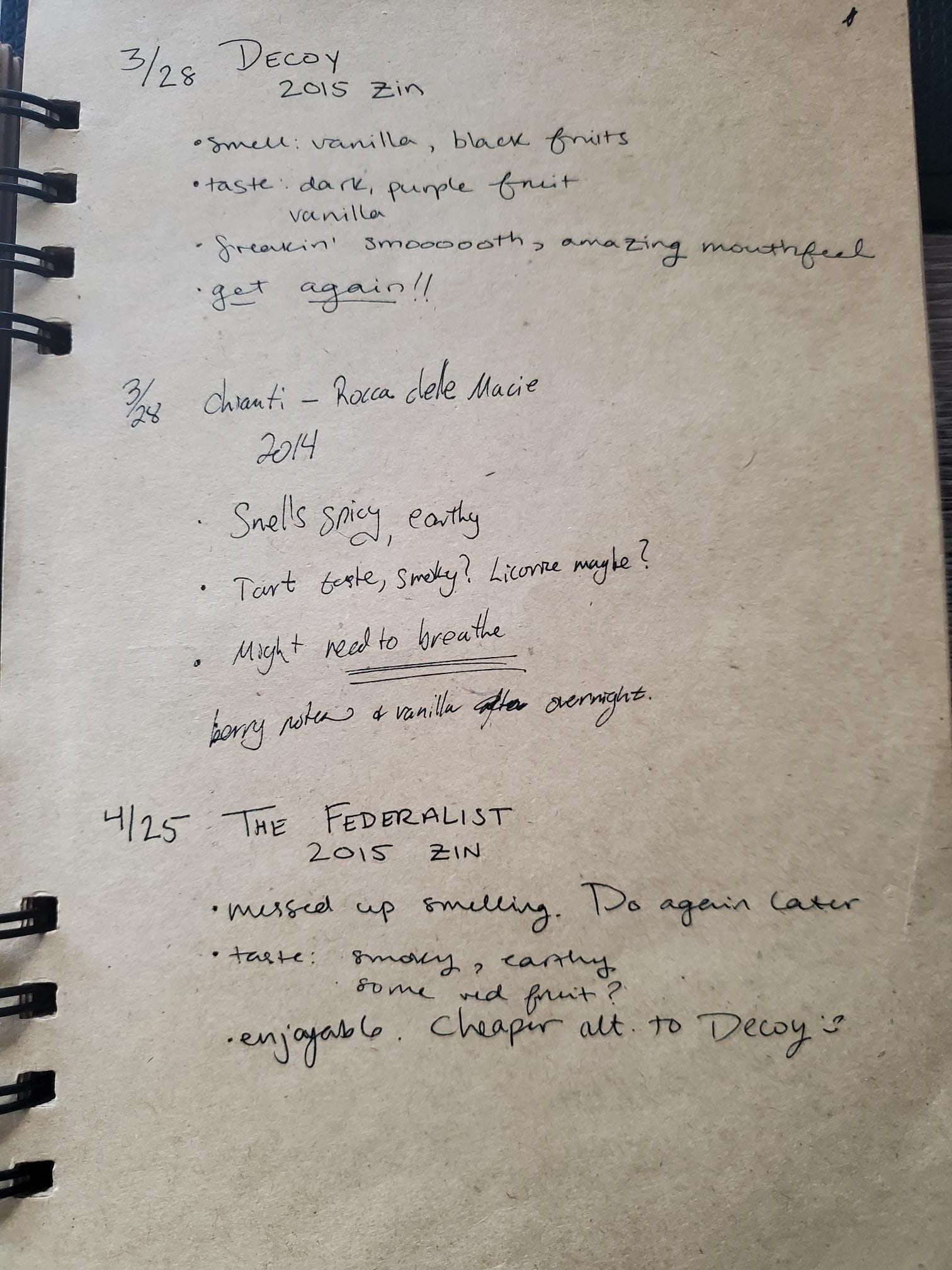
Getting the pages
Extracting the text was pretty straightforward, but I did it in two stages:
Prompt 1:
Given this image:
First, describe the image
Then, detail the notes. Include dates, vintage, manufacturer and notes
Prompt 2 (includes Pydantic Model and JSON output):
##Notes:##
{text_entry}
Given the notes above, convert the entries into JSON format.
For the page above the result looks like this:
    [
        {
            "date": "3/28",
            "wine": "Decoy",
            "vintage": "2015",
            "varietal": "Zinfandel",
            "notes": {
                "smell": ["Vanilla", "Black fruits"],
                "taste": ["Dark, purple fruit", "Vanilla"],
                "verdict": "Freakin' smooth, amazing mouthfeel"
            },
            "additional_notes": "Get again!!"
        },
        {
            "date": "3/28",
            "wine": "Chianti-Rocca dele Macie",
            "vintage": "2014",
            "varietal": "Unknown",
            "notes": {
                "smell": ["Spicy", "Earthy"],
                "taste": ["Tart", "Smoky?", "Licorice maybe?"],
                "verdict": "Might need to breathe"
            },
            "additional_notes": "Notes with line strike through and illegible."
        },
        {
            "date": "4/25",
            "wine": "The Federalist",
            "vintage": "2015",
            "varietal": "Zinfandel",
            "notes": {
                "smell": [],
                "taste": ["Smoky", "Earthy", "Some red fruit?"],
                "verdict": "Enjoyable"
            },
            "additional_notes": "Messed up smelling. Do again later. Cheaper alt. to Decoy :)"
        }
    ],
Once all of the pages were in the database I had a nice structured dataset to work with. It did remove a bit of our “flavor” — “smoooooth” became “smooth” but overall I’m pretty happy with it.
Checking the database
When we had a new wine, I wanted to check against these data to see if we had it before and what we thought of it. Enter Exhibit B.
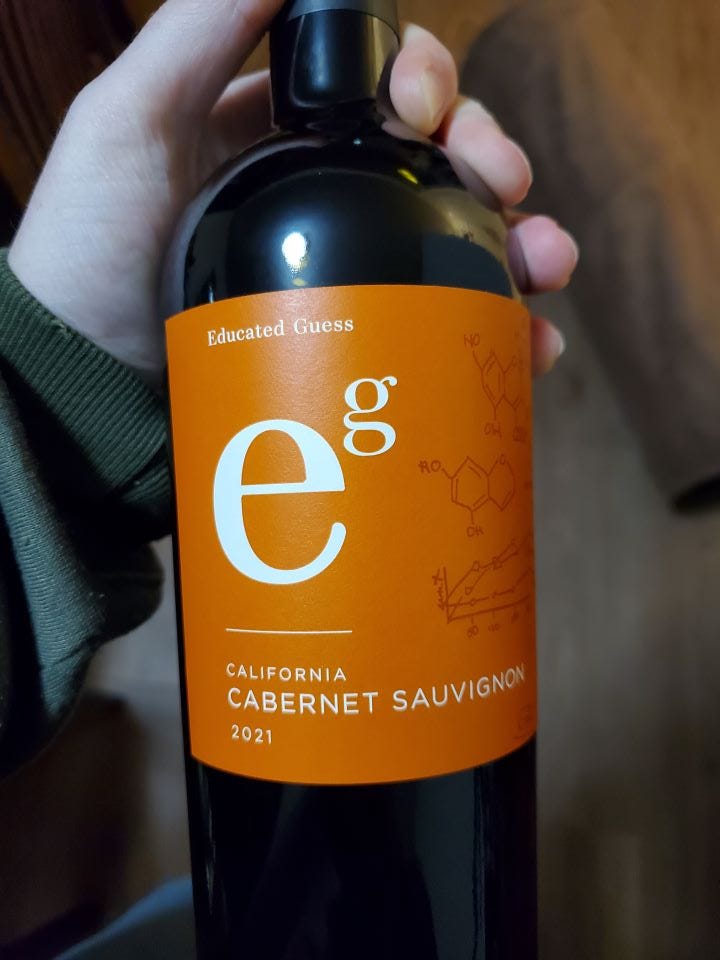
Sending this to VineScribe with the subject “check” gets three stages.
Extract the text from the label
Compare the wine to the database
Draft an email using the comparisons
Prompt 1:
Given this image:
First, describe the image
Then, detail the label. Include dates, vintage, manufacturer and varietal
Prompt 2:
##Notes:##
{wine_text}
Given the notes above, compare the wine in the note to the data here:{str(existing_data)}
If there is a match between the wine in the note to the data, write what the notes were and when the entry was made. If not, state that the wine has no entry. If there is a similar wine, say which one and why it is similar.
Prompt 3:
##Notes:##
{str(comparisons)}
This is a list of comparisons for user queries to see if the wine is in the database. Write a response to indicate if this wine has notes in the database or if not, any similar wines. If there are similar wines, give the tasting notes of those so the user knows if the query wine is one they may like.
Sign off as Best, VineScribe. Only include the response itself. Be friendly and helpful!
I sent this in and expected a match because Ed Guess is one of our go-to wines when we want a Cab Sauv. But to my surprise VineScribe was unable to locate one of our favorite wines. Looks like we get a little lazy with wines we know. I did double check our notebook to make sure the data extraction wasn’t to blame and indeed we just never took notes on it. It did find the Merlot (which we were a little judgy at the time. Maybe we had recently watched Sideways) and gave a pretty good response. “Hot peppers” is certainly an interesting note we had…
Email Response from VineScribe:
Unfortunately, I don't have any tasting notes for the "Educated Guess" Cabernet Sauvignon (2021, California) in my database.
However, I do have notes for an "Educated Guess" Merlot from 2018! It might give you some insight into the brand's style. Here's what I have:
Educated Guess Merlot (2018):
Smell: Cherry, licorice, Cedar/sandalwood, red fruits, strawberry
Taste: Warm, cherry, hot peppers, dry
Verdict: Good! (for a Merlot...)
Additional Notes: Very complex!
Perhaps these notes for the Merlot will help you decide if you'd like to try the Cabernet Sauvignon.
Best, VineScribe
What Worked, What Didn’t, and What’s Next
What Worked:
The email based system is pretty great I have to admit. It’s a little different than having an LLM just generate a response in real time, but it’s oddly nice to get an email. Maybe it feels more personal? Maybe I’m old now?
The offline queue means I don’t need it running 24/7 and still can process pages when I need to. Gemini handled my quick photos and chicken scratch pretty well proving I don’t need perfect scans or anything more than a quick picture with my phone (which is good because there is a good chance wine will be involved in the process).
Having the email system set up is nice because now I have a method to send and receive emails for all of my projects.
Didn’t Work:
I don’t recommend processing the pages in a notebook the way I did. Gmail balked at large email attachments which meant I had to manually split the photos into separate emails with a maximum of 3 photos each. In the future, I’d zip the files and upload them to Google drive, or maybe just do a batch download from my phone and process them at once. The email method does work well for a handful at a time, so as long as I don’t forget for another six years and put it off, I should be fine.
For authentication, I already said I’d change it up. It doesn’t complain if it can’t authenticate (because it has no way to communicate outside of the Pi) so if the authentication fails at the moment it just errors out. If I’m not at the keyboard then I can’t authenticate interactively in the local browser. First thing to change if this is going to be more than a proof-of-concept is to make this something that doesn’t need a user to help authenticate. And a louder error message.
For now, I’ll stick with the email setup but a webpage with login and an API might be a good step. Since this isn’t doing any data processing locally, it can be a very light device on LAN, so perhaps even a Raspberry Pi Zero could work and be “always on”. Although I don’t know if those have WiFi.
What’s Next:
VineScribe turned our tasting notes (and my untidy scrawl) into a searchable digital service. While it’s not perfect, it was definitely a satisfying proof-of-concept. Whether we’re reminiscing about our favorite vintage or altering the Raspberry Pi to catch our cat munching on spider plants (bonus project I’m tempted to try), VineScribe is a neat little tool to keep documenting our favorite wines.
If you’re a wine enthusiast, an AI tinkerer, or just someone who loves creative automation, I’d love to hear your thoughts! Try building your own version or drop me a message with your own wine-tracking ideas. 🍷 Cheers!